Automate and Auto-Merge Pull Requests using GitHub Actions and the GitHub CLI
Table of Contents
So I’ve written about how I automated content updates for my blog before. I even gave a talk on it.
Automate syndication of your content with Eleventy, dev.to, and GitHub ActionsThis post builds off of that. I recently improved how I automate content updates for my blog. This is a recap in case you haven’t read my post above.
How content automation was#
I use dev.to as a headless CMS via the dev.to API. I run that in a nightly GitHub action that pulls the latest content, and if anything has changed, I merge those changes to the main branch. I also update my streaming page on my website with my latest videos from YouTube using the YouTube API.
This has been working fine, but it has some shortcomings:
-
Pushing straight to the
mainbranch without a pull request (PR), there are no deploy previews on Netlify. -
Branch protection was pretty loose
-
If there are issues building the site, I’ll only know about it when it fails to build for production.
How content automation improved#
So I decided to automate creating pull requests (PR) for content updates and auto-merge them as long as all my checks pass.
https://github.com/nickytonline/iamdeveloper.com/pull/61Having a PR brings all the things that were lacking:
-
Now there are deploy previews on Netlify
-
Branch protection is more rigid. I require checks to pass as well as a pull request.
-
If a build fails, I’ll see it happen for a deploy preview instead of a build for production.
Prepare your Repository for PR Automation#
General Repository Settings#
To be able to auto-merge a branch, you need to modify some settings in your repository. Navigate to, e.g. https://github.com/nickytonline/iamdeveloper.com/settings, scroll to the bottom of the general settings and ensure that Allow auto-merge is checked.

Optionally, what I did was auto-delete branches. If you want to do the same, ensure that Automatically delete head branches is checked.

Configuring Branch Protection#
This is not required for what I’m demonstrating, but I and many others in the industry highly recommend enabling branch protection in general for a repository.
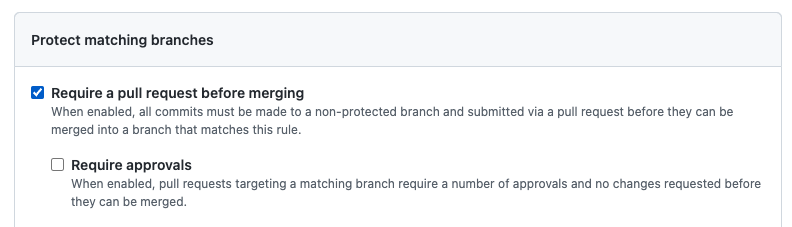
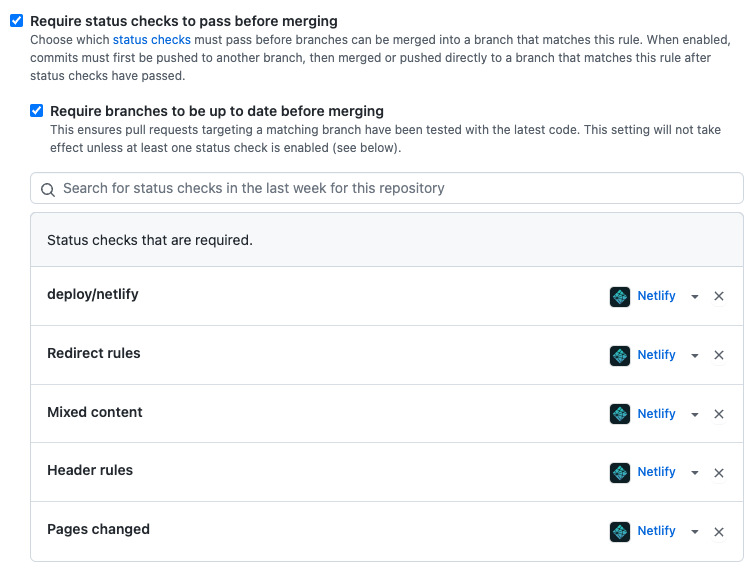
For the auto-merge PR use case, we’ll add the following branch protection for the main branch:
- Require PRs for the main branch
- Do not require PR approvals
- Require checks to pass
Automating an Auto-Merge PR#
I already had a GitHub action in place to update content. They run once a day. For example, here is how the update blog posts action looks like
name: Get latest blog postson: schedule: # Everyday at midnight UTC - cron: '0 0 * * *' workflow_dispatch:
jobs: update_profile_data: name: Get latest blog posts runs-on: ubuntu-latest steps: - uses: actions/checkout@v2 - uses: actions/setup-node@v3 with: node-version: 16.17.1 - name: Get blog posts env: DEV_API_KEY: ${{ secrets.DEV_API_KEY }} run: | npm install node --experimental-fetch bin/generateDevToPosts.js node bin/generateHashnodeUrlMapping.js - name: Commit changes id: commit env: GITHUB_TOKEN: ${{ secrets.GITHUB_TOKEN }} run: | git config user.name "GitHub Actions Bot" git config user.email "<>" git pull origin main git add . if [[ -n "$(git status --porcelain)" ]]; then git commit -m "chore (automated): update blog posts" git push origin main fiThe main things happening here are I’m getting the latest code from the main branch, and then I run
npm installnode --experimental-fetch bin/generateDevToPosts.jsnode bin/generateHashnodeUrlMapping.jsIf you’re wondering why I’m using --experimental-fetch, it’s because I’m using native fetch in Node.js 16.
The scripts above generate changes if any. If there are changes, they’re committed and merged into the main branch.
git config user.name "GitHub Actions Bot"git config user.email "<>"git pull origin maingit add .if [[ -n "$(git status --porcelain)" ]]; then git commit -m "chore (automated): update blog posts" git push origin mainfiTo use a PR instead, I went with the following, in this case, for updating blog posts.
PR_TITLE="chore (automated): update blog posts"BRANCH_NAME="chore_automated_update_blog_posts_$(date +%s)"
git branch $BRANCH_NAMEgit switch $BRANCH_NAME
# There are potentially multiple files if the blog post has images.git add .
# See if we have any changes. We should.if [[ -n "$(git status --porcelain)" ]]; then echo "Creating PR \"$PR_TITLE\" for branch $BRANCH_NAME" git commit -m "$PR_TITLE" git push origin $BRANCH_NAME gh pr create --title "$PR_TITLE" --body "This is an automated PR to update blog posts" gh pr merge --auto --delete-branch --squash "$BRANCH_NAME"else # Shouldn't end up here, but log that there was nothing to sync echo "Looks like there was nothing to update."fiSo like before, the GitHub action has already gotten the latest code from the main branch, and we’ve run our Node.js scripts to get the latest blog posts.
Instead of committing straight to the main branch, we now create a PR via the GitHub CLI.
gh pr create --title "$PR_TITLE" --body "This is an automated PR to update blog posts"Once the pull request is created, the following GitHub CLI command sets up the PR to auto-merge if all the checks pass.
gh pr merge --auto --delete-branch --squash "$BRANCH_NAME"The Result#
After publishing this post, I ran the GitHub action, and this is the PR it generated and auto-merged.
https://github.com/nickytonline/iamdeveloper.com/pull/64And that’s it. I love automated work, and GitHub Actions and the GitHub CLI facilitate this.
Photo by Richy Great on Unsplash